

As the APEC gathering in Shenzhen brings remote work into focus, many teams are looking again at how they handle everyday tasks outside the office. Working from home can save commuting time, but it does not always reduce the time spent finding information, checking spreadsheets, preparing reports, and moving between applications.
An AI assistant on a PC can take on parts of that work. Yet a request such as “analyze this sales spreadsheet, identify the key points, and prepare a presentation” requires more than a model-generated answer. The system must read files, calculate data, organize the findings, and create a usable document.
This is where an on-device AI agent needs more than a capable model. It also needs an execution framework and reusable professional skills. Ailyn brings together a lightweight Harness framework and a Skill system to help the model focus on understanding and decisions while the framework organizes the work and local scripts handle defined operations.
01 | Why an On-Device AI Agent Needs More Than a Model
A typical office request involves several stages: understanding the goal, locating source files, extracting information, performing calculations, organizing the results, and generating a deliverable. If every stage depends on repeated model instructions and improvised tool calls, the workflow can become slow and difficult to manage.
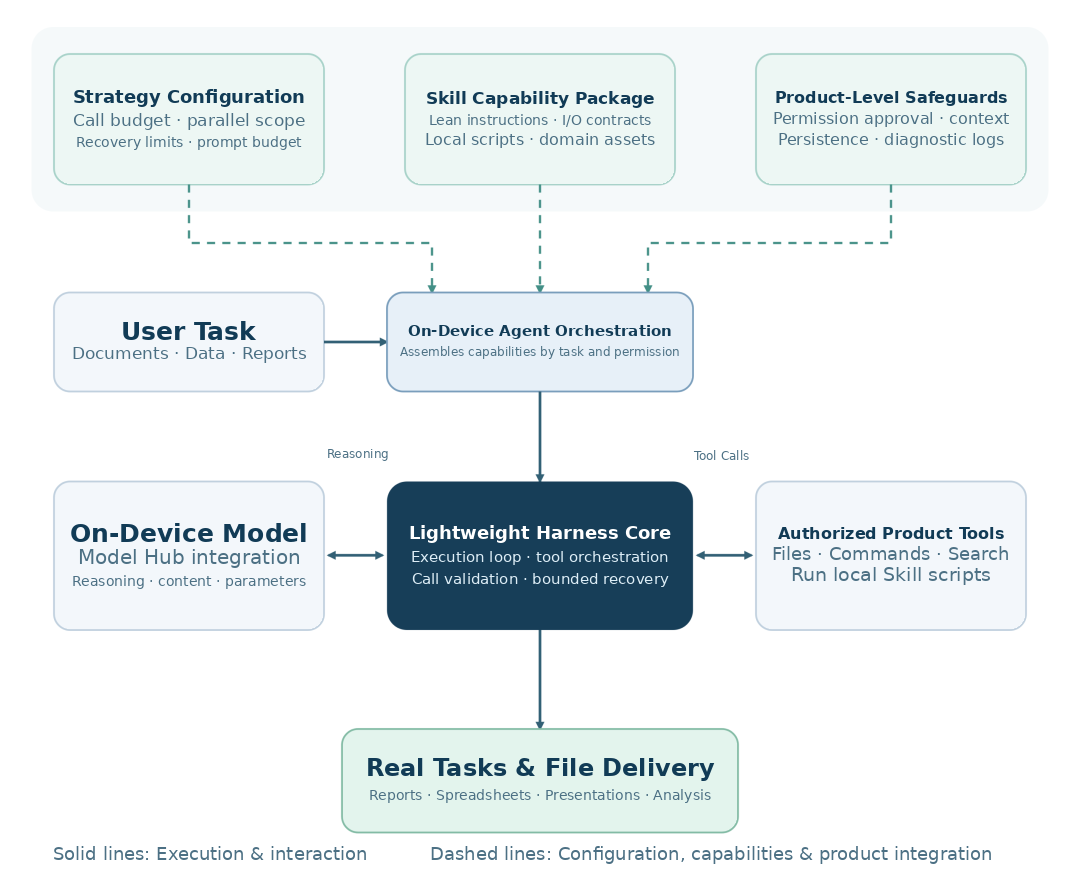
Ailyn separates the work into three cooperating parts:
- The model handles reasoning. It interprets the user's goal, selects an appropriate operation, organizes information, and explains the results.
- The Harness organizes execution. It connects the model with available tools, manages call validation and execution order, and applies budgets and bounded recovery rules.
- Skills provide professional methods. They package concise instructions, input and output requirements, local scripts, and domain-specific resources for repeatable tasks.
These components work with the product's existing model connections, file system, permission approvals, and context management. Skill scripts run through authorized tools and follow the same execution boundaries as other product capabilities.
02 | A Lightweight Harness Keeps the Workflow Organized
On-device environments have practical limits. Computing resources, memory capacity, and model size can all affect how quickly an AI agent completes a task. Ailyn therefore uses a modular execution design, allowing the Harness, product capabilities, and professional Skills to evolve without requiring every change to be made inside the framework's core.
A Lightweight Core for the Execution Loop
The Harness packages model-and-tool interaction, call validation, scheduling, and loop control into a focused component. Model connections, security approvals, and knowledge-base services can be connected through interfaces and middleware. This keeps the execution flow easier to optimize while allowing the system to reuse capabilities already available in the product.
Plugin-Based Extensions for New Capabilities
New capabilities can be assembled from tools, Skill instructions, scripts, and reference resources. The product layer combines the components required for a task. Before execution, the system can build prompts around the tools and permissions that are actually available, reducing the chance that the model will request an unavailable operation.
Configurable Policies for Different Tasks
Call budgets, the scope of parallel read-only operations, recovery limits, and prompt budgets are managed as configurable policies. Session workspaces and reasoning settings are passed into the execution process. Teams can adjust these parameters for different devices and workloads, then evaluate the results without repeatedly changing the Harness core.
03 | Four Skill Layers Turn Expertise into Reusable Capabilities
Professional tasks often combine decisions with operations that follow clear rules, such as calculations, document construction, and format processing. Ailyn organizes adapted on-device Skills into four layers so the model can use the right guidance without carrying every instruction into every request.
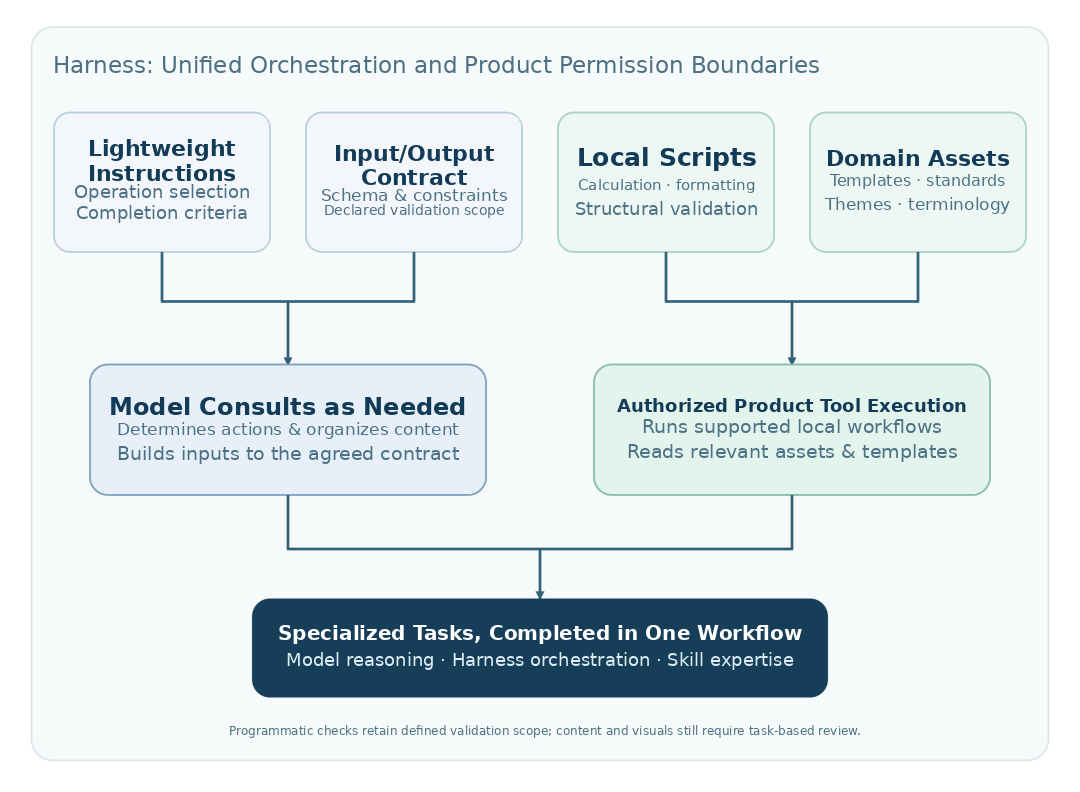
- Lightweight instructions: Compact metadata helps the system discover a Skill. Full guidance is loaded when needed and focuses on its use cases, entry points, required parameters, and completion criteria.
- Input and output contracts: Defined schemas specify input files, parameters, result fields, required values, and accepted ranges. They also describe return status, output paths, and error information.
- Local scripts: Reusable scripts handle established workflows such as document generation, spreadsheet calculations, and page processing. This reduces the need for the model to write and repeatedly repair low-level code for each task.
- Domain assets: Templates, themes, standards, and terminology libraries are maintained separately and loaded when a task needs them. This makes professional resources easier to update and extend.
Example: From a Sales Spreadsheet to a Presentation
Consider a user request: “Analyze this quarterly sales spreadsheet, identify the main trends, and prepare a presentation.” The model first checks the relevant fields and confirms the required calculation scope. A spreadsheet Skill runs the defined calculations. The model then interprets the results and organizes the story, while a presentation Skill builds the file using its supported document-generation process.
The model can focus on business interpretation instead of repeatedly writing code for routine formatting and calculations. The scripts follow their defined rules, while the user can still review data accuracy, business definitions, and presentation quality before using the final file.
04 | Better Prompt and Context Management Reduces Unnecessary Work
An efficient on-device AI agent must manage every interaction between the model and its tools. Ailyn applies several execution practices to help tasks move forward with fewer repeated steps.
- Load only relevant instructions. Prompts are assembled around the tools available for the current task. Skill guidance is loaded when needed, reducing the resources spent on unrelated instructions and examples.
- Reuse completed work. Previously parsed document results can be reused. Independent read-only operations can run in parallel within defined limits, while write operations, approvals, and dependent steps retain their required order.
- Keep context manageable. Large results can be persisted and revisited through previews or range-based reads. Summaries and history archiving help control context growth and leave room for longer tasks to continue.
- Recover within clear limits. Parameter errors, missing inputs, and execution failures are converted into understandable feedback. When conditions allow, the system can make a bounded correction instead of repeating the same failed operation without change.
These practices are especially relevant when a task involves several files or tools. They help avoid unnecessary prompt expansion, repeated parsing, and uncontrolled retries while keeping the execution process easier to inspect.
05 | What Users Gain from a More Efficient Local AI Workflow
Less Waiting on Repetitive Processing
Concise instructions, reusable scripts, and cached parsing results can reduce repeated reasoning and processing. This is useful for local workflows that require several operations to reach a finished result.
Fewer Manual Hand-Offs Between Applications
Users can describe an outcome in natural language. Within the supported tool and permission scope, the agent can connect file reading, calculations, content organization, and file generation. This reduces the need to copy information between applications or manually divide a task into every small step.
Clearer Execution Status and Deliverables
Professional operations can return a status, output path, and relevant validation information. If an input is missing or an operation is not supported, the system can identify where the workflow is blocked so users can decide what to do next.
More Control over Local Workflows
Local inference and file processing can reduce the workflow's dependence on cloud-based reasoning. At the same time, online search and external services still operate according to their actual connections and permissions. This distinction helps users understand which operations remain local and which require external access.
Bringing On-Device AI into Real PC Workflows
For teams exploring local AI on PCs and edge devices, execution design matters alongside model capability. Hardware selection should also match the model size, memory, storage, thermal design, and workload. Actual software and Skill compatibility depends on the specific device configuration and supported environment.
Emdoor provides rugged computing solutions for mobile and industrial work environments. Explore our rugged tablets and industrial PCs when evaluating hardware for demanding workflows. For a specific local AI deployment, confirm the required configuration and software support with the Emdoor team.
As AI moves from answering questions to assisting with real tasks, the next step is to test it against the work people do every day: reading files, checking data, preparing reports, and producing deliverables. Ailyn's Harness and Skill approach is designed to make those steps more organized, reusable, and easier to manage.
Explore Emdoor Rugged Computing Solutions
Discover computing platforms designed for mobile work, industrial applications, and demanding environments.