





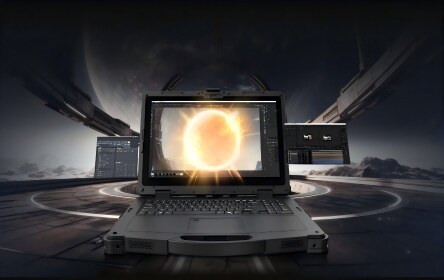




Updated: June 2026 | Topic: Vehicle PC, Fleet Management, Forklift Computer, Transportation
Vehicle PC for Fleet Management: Reliable Computing for Trucks, Forklifts, and Transportation
Quick answer: a vehicle PC is the better choice when computing needs to stay reliably mounted inside a truck, forklift, delivery vehicle, bus, or industrial vehicle. Compared with a general mobile tablet, a vehicle PC is designed around stable mounting, vehicle power, vibration resistance, GNSS positioning, wireless communication, and long-shift operation. If workers need to remove the device frequently for proof of delivery, inspection, or field service, a rugged tablet may be more flexible. If the screen stays in the vehicle most of the day, a vehicle PC is usually the stronger option.
Use vehicle PCs for dispatch, navigation, driver communication, route updates, vehicle inspection, and data synchronization.
Use vehicle-mounted computers for WMS tasks, put-away, picking, loading, yard work, and real-time warehouse instructions.
Prioritize GNSS, wireless connectivity, vehicle dock, readable display, speaker support, and stable power input.
For off-vehicle work, compare this guide with our article on the best rugged tablet for field service and logistics.
In the previous rugged tablet guide, the main question was how to choose a mobile device for field service, warehouse, and logistics teams. This article continues the same decision path from the vehicle side. Many fleet and warehouse projects do not fail because the software idea is wrong. They fail because the device is not designed for the place where it is used: a vibrating forklift, a delivery truck, a warehouse dock, a bus cabin, or a yard vehicle that runs through long shifts.
A vehicle PC, also called a vehicle-mounted computer or forklift computer, is built to support in-vehicle workflows. It gives drivers and operators a reliable screen for receiving instructions, confirming tasks, communicating with dispatch, viewing routes, capturing data, and keeping operational systems updated. The goal is not just to put a tablet into a vehicle. The goal is to make the vehicle part of the digital workflow.
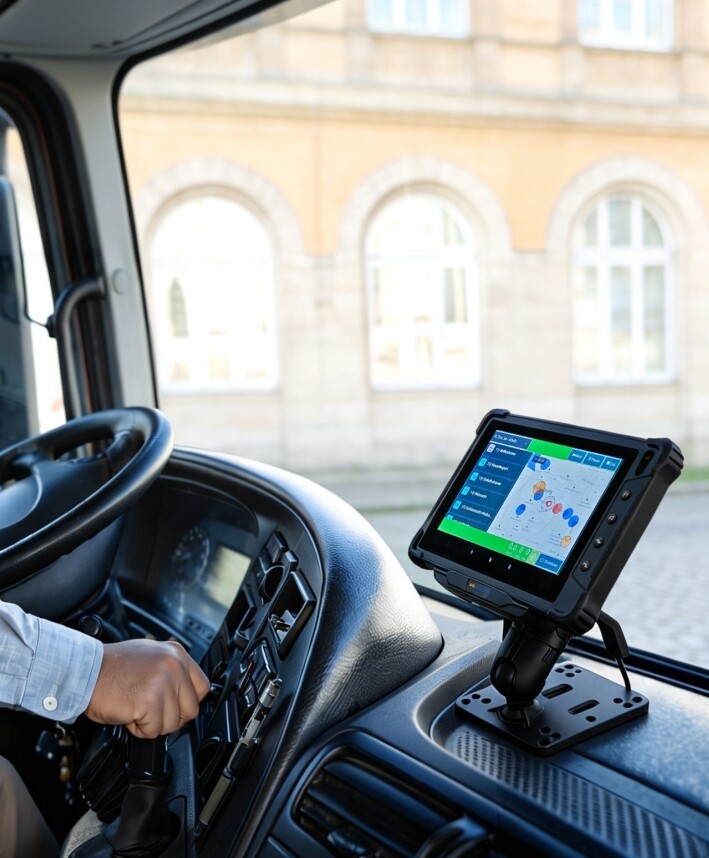
What Is a Vehicle PC in Fleet Management?
A vehicle PC is an industrial computer designed for use in vehicles such as trucks, forklifts, buses, delivery vans, warehouse tractors, port equipment, emergency vehicles, and other mobile assets. It usually combines a rugged display, vehicle-ready mounting, stable power input, wireless communication, and interfaces for peripherals such as scanners, printers, cameras, speakers, or external antennas.
In fleet management, the vehicle PC becomes the operator’s working terminal. It can support dispatch instructions, navigation, proof of delivery, route updates, vehicle inspection forms, driver communication, cargo verification, and real-time data transfer. In warehouses, it can support WMS screens, forklift picking tasks, pallet movement, loading confirmation, and yard management.
Practical view: if the operator mainly works inside a vehicle and needs a screen that stays powered, mounted, and connected, start by evaluating a vehicle PC. If the operator frequently leaves the vehicle and carries the device to scan, inspect, or collect signatures, review a rugged tablet as well.
Vehicle PC vs Rugged Tablet vs Rugged Handheld: How to Choose
This is the most important connection with the rugged tablet article. A rugged tablet, a vehicle PC, and a rugged handheld can all appear in logistics or warehouse projects, but they solve different problems. The wrong choice can create small daily friction that becomes expensive at scale.
| Device Type | Best Fit | Typical Workflows | Main Risk If Chosen Wrong |
|---|---|---|---|
| Vehicle PC | Fixed or semi-fixed in-vehicle operation | Forklift WMS, fleet dispatch, route guidance, loading confirmation, driver communication | Too fixed if workers need to carry the device outside the vehicle often |
| Rugged tablet | Mobile work between vehicle, warehouse, field site, and customer location | Proof of delivery, field service, inspection, asset tracking, mobile forms, photo records | May need extra dock, power, and mounting planning for long in-vehicle use |
| Rugged handheld | High-frequency scanning with minimal screen interaction | Inventory count, parcel scanning, retail stocktaking, asset check, warehouse picking | Screen may be too small for maps, dispatch dashboards, or complex forms |
For many logistics teams, the best result is not one device for everyone. A forklift driver may need a vehicle PC. A delivery driver may need a rugged tablet. A warehouse picker may need a rugged handheld. A dispatcher may need a desktop dashboard connected to all three.
Why Fleet Management Needs Vehicle-Ready Computing
Fleet management is built on real-time visibility. Dispatchers need to know where vehicles are, what task each driver is handling, whether a route changed, whether a delivery was completed, and whether the operator needs support. A vehicle PC helps bring these workflows into the vehicle cabin.
For trucks and delivery vehicles, the device may support route updates, driver messages, document capture, delivery confirmation, inspection forms, and navigation. For buses or public transit, it may support communication, route status, schedule updates, ticketing, passenger information, or peripheral integration depending on the project. For industrial vehicles, it may connect the vehicle to warehouse, yard, or plant systems.
Common Fleet Tasks
- Dispatch instructions and route updates.
- Driver communication and voice alerts.
- Vehicle inspection forms and issue reporting.
- Proof of delivery and document capture.
- GNSS positioning and trip records.
Why Consumer Devices Struggle
Vehicles create vibration, power variation, heat, sunlight, dust, and constant movement. A consumer tablet may work during a short test, but problems often appear after long shifts: unstable charging, weak mounting, poor outdoor visibility, loose cables, or unreliable peripheral connections.
Forklift Computer Use Cases in Warehouses and Logistics Centers
Forklift operations are one of the strongest use cases for vehicle PCs. A forklift driver needs clear instructions without leaving the seat for every task. With a properly mounted vehicle computer, the driver can see put-away locations, picking tasks, pallet movement instructions, loading sequences, and inventory updates while staying connected to the WMS.
The device should not block visibility or make operation harder. Mount position, screen angle, brightness, cable routing, dock stability, and wireless roaming all affect the final result. Forklift safety rules also remind operators to maintain a clear view and look in the direction of travel, so the installation should support work rather than distract from it.
| Forklift Workflow | Vehicle PC Value | What to Test |
|---|---|---|
| Receiving | Displays inbound tasks, pallet IDs, dock instructions, and receiving status. | Scanner connection, Wi-Fi signal near docks, screen readability under mixed light. |
| Put-away | Guides the operator to the correct storage location and updates WMS records. | WMS page layout, touch target size, mounting position, route clarity. |
| Picking | Shows pick lists, pallet movement, and confirmation steps without paper. | Barcode scanner pairing, screen response with gloves, repeated task speed. |
| Loading | Supports loading order, shipment verification, and dock coordination. | Connection near loading doors, vibration resistance, task confirmation flow. |
Key Features to Check Before Choosing a Vehicle PC
A vehicle PC should be evaluated as a complete in-vehicle system. The display, dock, power input, mount, network, peripherals, operating system, and software must work together. A good specification sheet is useful, but the real test is whether the device can stay stable through a working shift.
| Feature | Why It Matters | Buyer’s Checkpoint |
|---|---|---|
| Vehicle dock and mount | The device must stay stable during vibration, turns, braking, and repeated operation. | Check mounting method, dock lock, cable routing, viewing angle, and removal process. |
| Wide-voltage power input | Vehicles may have power fluctuation, ignition events, or different voltage systems. | Confirm the supported input range, power protection, dock power design, and vehicle compatibility. |
| GNSS and antenna support | Fleet systems need reliable positioning for route, dispatch, and asset tracking. | Test positioning accuracy inside the actual vehicle and review external antenna options. |
| Wireless communication | Real-time work depends on stable data across roads, yards, warehouses, and depots. | Review Wi-Fi, Bluetooth, 4G/5G options, roaming performance, and SIM plan requirements. |
| Display and touch | Drivers and operators need to read information quickly under sunlight, warehouse lighting, or night shifts. | Check brightness, anti-glare design, touch mode, glove use, and dashboard layout. |
| Peripheral interfaces | Fleet and warehouse projects may need scanners, printers, cameras, speakers, or external GPS. | Confirm ports, dock expansion, driver support, and software integration before rollout. |
Windows, Android, or Linux Vehicle PC: Which System Fits?
The operating system should be chosen around the software stack. A fleet project that runs Android dispatch apps has different requirements from a warehouse project using Windows-based WMS software or an industrial vehicle system built around Linux customization.
| Operating System | Best For | Before You Decide |
|---|---|---|
| Android vehicle PC | Fleet apps, driver communication, proof-of-delivery tools, mobile dispatch, simple training. | Check Android version, MDM support, app compatibility, Google services needs, and peripheral SDKs. |
| Windows vehicle PC | Windows WMS, legacy dispatch systems, industrial software, enterprise security environments. | Confirm CPU performance, memory, storage, Windows version, drivers, and domain or VPN policies. |
| Linux vehicle PC | Customized fleet terminals, embedded vehicle systems, industrial control, long-term software control. | Review kernel, driver support, UI requirements, OTA strategy, and long-term maintenance plan. |
The safest test is simple: install the real software, connect the real peripherals, mount the device in the real vehicle, and run it through a normal working shift. If the test only happens on a desk, it misses the problems that appear in motion.
A 7-Step Vehicle PC Deployment Checklist
A vehicle PC project should be treated as a deployment, not only a hardware purchase. Use this checklist before buying in quantity.
List whether the device will be used in trucks, forklifts, buses, delivery vans, yard vehicles, port vehicles, or industrial equipment. Different vehicles have different mounting and power needs.
Clarify whether the operator needs dispatch, WMS, navigation, proof of delivery, vehicle inspection, cargo verification, driver communication, or camera integration.
Confirm voltage range, ignition behavior, cable routing, dock lock, charging stability, and whether the device must be removed from the vehicle.
Review sunlight readability, night visibility, touch accuracy, glove operation, screen angle, and whether the display distracts or supports the operator.
Test Wi-Fi roaming in warehouses, cellular signal on routes, GNSS reception inside the vehicle, and external antenna needs.
Pair scanners, printers, cameras, speakers, external GPS antennas, or other accessories before rollout. Do not assume a port means the workflow is already solved.
Let drivers, forklift operators, dispatchers, and IT staff test the vehicle PC under real work conditions. Their feedback will reveal mounting, touch, visibility, and workflow issues early.
Common Mistakes to Avoid in Vehicle PC Projects
Vehicle PC projects often look straightforward on paper: choose a screen, install software, mount it in the vehicle. In practice, the details decide whether the system improves work or becomes another device operators try to avoid.
| Mistake | What Happens | Better Approach |
|---|---|---|
| Choosing a tablet and adding a cheap mount | The device may shake, cables loosen, charging becomes unreliable, and operators lose trust. | Evaluate the vehicle dock, mount, power, and accessories as part of the full system. |
| Ignoring operator visibility | The screen may block view, create glare, or distract the driver. | Test mounting position inside the actual vehicle with the operator seated. |
| Forgetting power behavior | The device may reboot, drain batteries, or shut down at the wrong time. | Review power input, ignition control, dock charging, and shutdown strategy. |
| Testing only in the office | Real problems with vibration, Wi-Fi roaming, GNSS, and glare appear after deployment. | Run field tests in vehicles, warehouses, routes, docks, and yards. |
| Buying one model for every vehicle | Forklift, truck, bus, and delivery workflows may need different screens, mounts, and software. | Segment by vehicle type, operator role, and workflow before final selection. |
When a Vehicle PC May Not Be the Best Choice
A vehicle PC is powerful for mounted workflows, but it is not always the right device. The most helpful buying decision is sometimes to choose a different rugged device for a different role.
| Situation | Better Option | Reason |
|---|---|---|
| Drivers often leave the vehicle for proof of delivery, photos, signatures, or inspections. | Rugged tablet | A tablet is easier to carry between vehicle, warehouse, and customer site. |
| Workers mainly scan parcels, inventory, or assets with little screen use. | Rugged handheld | A handheld scanner can be faster, lighter, and more ergonomic for high-frequency scanning. |
| The project needs a fixed HMI on a production line or machine cabinet. | Industrial panel PC | A panel PC is usually better for fixed machine control and industrial display installation. |
| The workload requires heavy edge computing, multiple I/O boards, or AI processing. | Industrial PC or rugged AI PC | More computing power, thermal design, and expansion may be required. |
How Emdoor Vehicle PCs Support Fleet and Transportation Projects
Emdoor provides vehicle PC and vehicle-mounted computing options for fleet management, logistics, transportation, and industrial vehicle scenarios. For buyers who are also comparing off-vehicle mobile work, Emdoor’s rugged tablet line can be reviewed together with vehicle PCs to create a more complete device plan.
For example, the EM-V82T rugged vehicle tablet is positioned for fleet management in logistics and public transit, with an 8-inch 700-nit display, Android system, rear camera for waybill or receipt capture, and vehicle dock support for peripherals. The EM-V12R vehicle PC offers a 10.1-inch Android + Linux dual-system option with wireless connectivity, GNSS support, multiple interfaces, and wide-voltage input for vehicle deployment.
The stronger project approach is to build a role-based device map. A forklift driver may use a vehicle-mounted computer. A delivery driver may use a rugged tablet. A warehouse picker may use a rugged handheld. A factory or yard system may use an industrial PC for fixed control. This prevents one device from being forced into every workflow.
Final Recommendation: Match the Vehicle PC to the Vehicle, Not Just the Software
A vehicle PC for fleet management should be selected by vehicle type, operator role, mounting requirement, power environment, wireless coverage, and software workflow. Trucks, forklifts, buses, delivery vans, and industrial vehicles do not create the same working conditions. The best vehicle PC is the one that stays visible, stable, powered, connected, and useful during real work.
Start by separating mobile tasks from mounted tasks. If the worker leaves the vehicle often, compare the vehicle PC with a rugged tablet. If the device stays in the cabin most of the shift, focus on dock, mount, power, GNSS, communication, and display quality. Then run a pilot in the actual vehicle before deployment. That small test can prevent many of the problems that appear only after a fleet-wide rollout.
FAQs About Vehicle PCs for Fleet Management
What is a vehicle PC?
A vehicle PC is a rugged computer designed for use inside trucks, forklifts, buses, delivery vehicles, and industrial vehicles. It usually supports vehicle mounting, stable power input, wireless communication, GNSS positioning, and peripheral connection.
What is the difference between a vehicle PC and a rugged tablet?
A vehicle PC is better for fixed or semi-fixed in-vehicle workflows. A rugged tablet is better when workers need to carry the device outside the vehicle for inspection, scanning, delivery proof, or customer-facing tasks.
What is a forklift computer used for?
A forklift computer is used to display WMS tasks, picking instructions, put-away locations, loading information, inventory updates, and warehouse communication directly inside the forklift cabin.
Should fleet teams choose Android, Windows, or Linux vehicle PCs?
Choose Android for mobile fleet apps and driver workflows, Windows for legacy or enterprise software, and Linux for customized embedded vehicle systems. The best choice depends on your software, IT policy, and long-term maintenance plan.
What should I test before deploying vehicle PCs?
Test the vehicle dock, power input, mount position, display visibility, touch response, wireless coverage, GNSS reception, peripheral connections, and the actual fleet or warehouse software under real operating conditions.
Can vehicle PCs be used in both trucks and forklifts?
Yes, but the requirements may differ. Trucks may prioritize route updates, driver communication, GNSS, and proof-of-delivery workflows. Forklifts may prioritize WMS screens, mounting position, scanner connection, Wi-Fi roaming, and vibration resistance.
- Emdoor Vehicle PC product category: https://www.emdoorrugged.com/vehicle-pc.html
- Emdoor EM-V82T Rugged Vehicle Tablet: https://www.emdoorrugged.com/em-v82t-rugged-vehicle-tablet.html
- Emdoor EM-V12R 10.1 Inch Android + Linux Vehicle PC: https://www.emdoorrugged.com/em-v12r-10-1-inch-vehicle-pc-android-linux.html
- Emdoor Rugged Tablet product category: https://www.emdoorrugged.com/rugged-tablet.html
- FMCSA Electronic Logging Devices overview: https://www.fmcsa.dot.gov/hours-service/elds/electronic-logging-devices
- OSHA forklift operating guidance on visibility and maneuvering: https://www.osha.gov/etools/powered-industrial-trucks/operating-forklift/traveling-maneuvering